Vi håller på att översätta vår butik till svenska!
Men eftersom vi har många produkter och sidor tar det tid. Under tiden finns vår produktkatalog på engelska. Tack för ditt tålamod!
FAQ
An error message appears during registration, what can I do?
In this case, please write to account@misumi-europe.com, outlining the issue you have encountered. A MISUMI member will then get in touch with you to resolve the issue.
I have just registered a corporate account, why can't I order anything?
After completing your online registration, you can already log in to the MISUMI website, even if your registration as a corporate user has not been finally approved by MISUMI or your company's internal administrator yet. Until final approval, you are considered a CAD user for the system and cannot yet request quotations or place orders. In the meantime, we ask for your patience.
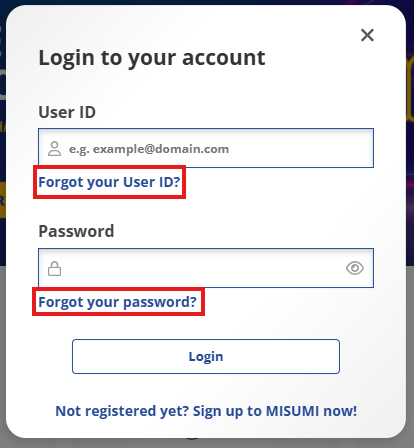
I tried to log in, but a message appears stating that the user ID or password is incorrect. What should I do?
You chose your personal Login-ID in the registration process. For older user accounts, the e-mail address you entered during online registration (not your MISUMI Customer Code) will be the login-ID. Check that the e-mail address you want to log in with is still up to date. You can use the 'Forgotten your password?' function to receive a new password. If you continue to encounter problems, please contact us at account@misumi-europe.com.
How can I change my login ID?
Due to system restrictions, it is not possible to change the login ID. If you would like to use a new login ID, please register a new corporate user account on the MISUMI website.
Where can I find my MISUMI customer code?
The customer number at MISUMI is called the Customer Code, consists of 6 characters and, in most cases, numbers and letters. MISUMI customer codes are always company-specific, not user-specific.
You can find your company's customer code on previously issued quotations, order confirmations, invoices and/or delivery notes.
You can also find your MISUMI Customer Code online in your MyMISUMI profile (after logging in) under “Personal Data” or by hovering your mouse over the button with your name.
If you do not yet have your own user account for your company's corporate account, you can find more information on user registration in the FAQ section.

Where can I change my personal data?
You can change your personal contact data here:
- Log in to the MyMISUMI customer portal.
- Click on Help Center and select the categories 'Account/user data' and 'Customer Data'.
- In the appearing drop-down menu, please select 'Contact Data'
- Fill in the form and send it to us.
Here you can request changes regarding your name, email address and telephone number. The change request will then be checked manually and amended in your account. The change can take up to half a working day, after which you will find the changed data in your online account.