Vi håller på att översätta vår butik till svenska!
Men eftersom vi har många produkter och sidor tar det tid. Under tiden finns vår produktkatalog på engelska. Tack för ditt tålamod!
FAQ
Product search at MISUMI
Search for the required item using the search bar on our website. You can search for the item using keywords, part numbers or a type code. Alternatively, look above the search bar and search by product category, brand or application. You can then configure your desired item using our product configurator.
Registration with MISUMI
Any officially registered company, any trader, as well as educational institutions, can register as a Corporate User. This registration is a prerequisite for ordering or requesting quotations from MISUMI. Details on how to register can be found in the FAQ. Once you have completed your registration, it will be checked manually. This usually takes half a working day. You will receive a message from us as soon as your registration has been successfully approved. Your registration is now complete and you can log in to the MISUMI website and make full use of your account. You can place orders, request quotations and use all other functions of the MyMISUMI customer portal. When registering as a CAD user, you enter your personal data and company name, accept the GTCs and submit the registration. CAD user registrations will not be checked manually and you can use your account as soon as the registration is completed. You can now download CAD data in the MISUMI website. Please be aware that as a CAD user you cannot create orders or request quotations.
Quotations at MISUMI
In order to receive a quote from MISUMI, it is necessary to be registered as a Corporate User. If you are a registered customer, log in to your account and request your quote online. You can find more detailed information on the enquiry process in the FAQ. You can download the offer directly as PDF file. If we need feedback from you, we will contact you. Please note that offers in the online shop can only be finalised if all possible problems (incorrect part numbers, delivery times requested from the suppliers, etc.) have been clarified in advance via the website and confirmed from your side. If you have any questions about your offer, please contact MISUMI Customer Service via the Help Center in your MyMISUMI profile.
Order at MISUMI
To place an order with MISUMI, you have to be registered as a Corporate User. If you are a registered customer, please log in to your account and place your order online. Immediately after placing the order you can download your order confirmation which also shows the shipping date. Information on the tracking number will be provided on the day of shipment. In case we need additional information we will contact you as soon as possible. More detailed information on the ordering process can be found in the FAQ. If you have any questions about your order, please contact us via the Help Center in your MyMISUMI-profile.
Delivery Process at MISUMI
Stock items ordered Mon-Thu by 4 pm and Fri by 3 pm (CET) are usually shipped the same day. All other items have a delivery time of 3-9 days (exceptions possible). Please refer to your order confirmation for the exact delivery date of your order. The shipping costs for online orders are displayed during the ordering process on our website. Alternatively, you will find these on your order confirmation. In Germany, orders are generally shipped with GLS whereas TNT is our standard provider for shipments to all other countries. If your company has a carrier account with TNT, FEDEX, UPS or DHL, this can be added to your MISUMI account, more information you can find in the FAQ. If you would like express delivery, you can find more information you can find in the FAQ.
Payment at MISUMI
Several payment options are available when you are ordering with MISUMI: Invoice (by bank transfer) and prepayment (by bank transfer, credit card (Visa & Mastercard) or PayPal).
Once the order has been shipped from our warehouse in Germany, the invoice will be generated. Since 2024 MISUMI only sends out electronic invoices via email. You can also download a copy of the invoice as PDF file in your MyMISUMI profile. You can enter your email address for electronic invoicing in your MyMISUMI-profile. In exceptional cases, MISUMI will send a pro forma invoice. If you have received a pro forma invoice, it must be paid before the order is processed. We will always inform you of any necessary advance payment as soon as possible after the order is placed.
Can I use my own product names/part numbers in the online ordering/quotation process?
You can conveniently use the custom product names/part numbers already registered in the MyMISUMI customer portal in the MISUMI online shop for quotations and orders.
- Click on “New Order/Quote”.
- Enter your custom product name in the “Part Number” field.
- Important: Please do not use the “Customer Item Reference” field for this purpose, as the system will otherwise not recognize your stored designation.
- Once the designation has been recognized, the complete product data will be displayed automatically.
- Enter the desired quantity and click on “Add to Cart”.
- You can then complete your quotation or order as usual.
Your custom product name will automatically appear in the quotation or order as a reference number.

Is it possible to Register/use own product names/part numbers in the MISUMI online shop?
With the Customer Part No. function, registered users can register individual product names/part numbers and share them within their company's corporate Account.
Please proceed as follows:
- Log in to your MyMISUMI customer profile
- In the menu on the left-hand side, go to “Customer Part No.”
- Select the option “Register Customer Part No.”
- Add names manually, via Excel, or by data upload
- Column 1: Custom product name
- Column 2: MISUMI part number
- Click “Confirm” and then “Save”
All saved product names/part numbers are automatically available to all users within the same MISUMI corporate account. In addition, the data can be managed at any time, downloaded as a CSV file, and used directly in the online ordering or quotation process.

How to connect with MISUMI in the MyMISUMI customer portal (CSSP)
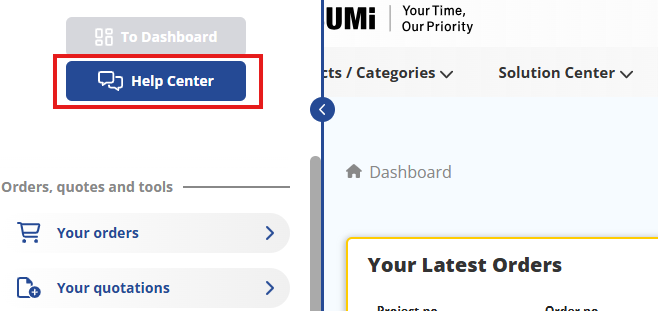
The easiest and fastest way to contact MISUMI is via the Help Center in the MyMISUMI customer portal:
- Log in to your MyMISUMI profile
- Click 'Help Center' in the left side menu
- Select the relevant category suitable for your issue request
- Fill out the form completely and submit your request
Please describe your issue as detailed as possible, so the customer service can assist you in the best way.
CAD-Download History in the MyMISUMI customer portal (CSSP)
In the CAD download history, you can review and check your already downloaded CAD data. It is also possible to download it again if needed.
You can find the CAD download history in your MyMISUMI profile.
- Log in to your MyMISUMI profile
- Click 'Tools' in the left side menu and find ‘CAD download history’.